If you’re playing competitive Battlegrounds Mobile India and getting ready for BGIS 2026, you’ve probably heard about the fairplay shield app BGMI players must use.
Some say it can cause bans, others are just confused about why it’s required. In this guide, I’ll explain exactly what the Fairplay Shield app is, why BGMI tournaments like BGIS 2026 use it, and how to install and use it safely without risking your account.
In this article, you’ll learn:
- What the Fairplay Shield app actually is in BGMI
- Why is it mandatory for BGIS 2026
- How it works during a tournament match
- Step‑by‑step installation and setup instructions
- Common Fairplay Shield errors and how to fix them
- How to stay safe and avoid bans
What Is the Fairplay Shield App BGMI Players Must Use?
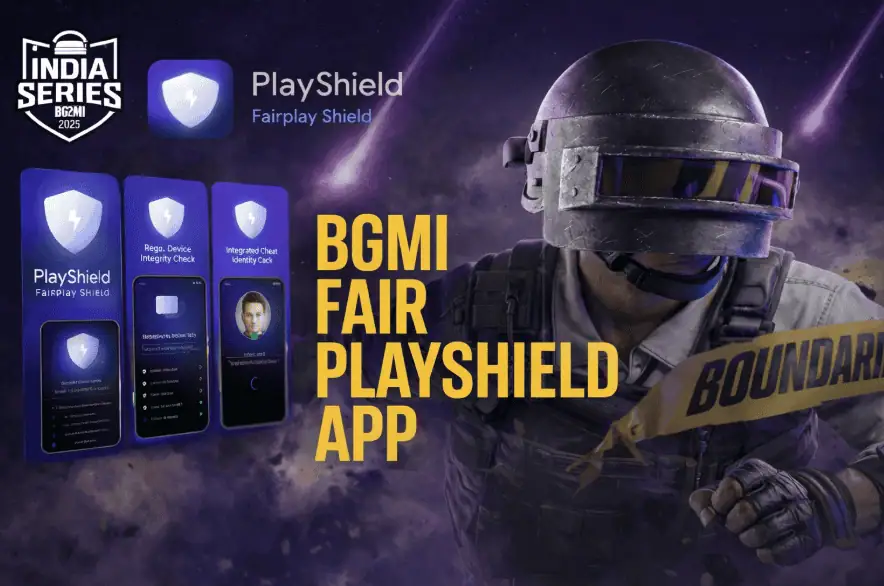
Fairplay Shield is an anti‑cheat and fair‑play monitoring app used for official BGMI esports events like BGIS 2026.
It runs alongside BGMI to:
- Check that you’re playing on a real device, not an emulator or secondary phone
- Detect prohibited third‑party tools or overlays running in the background
- Help tournament admins verify identity, device, and environment
Important points:
- It is separate from the normal in‑game anti‑cheat.
- It is focused only on competitions, not regular ranked or casual matches.
- If you play fair and follow the rules, it is meant to protect you, not punish you.
Why Did BGMI Introduce Fairplay Shield for BGIS 2026?
Over the years, cheating methods in mobile esports have become more advanced:
- External tools that don’t directly modify the game
- Background apps that give unfair vision, aim assist, or information
- Device manipulation and multi‑device setups
BGMI’s built‑in anti‑cheat can’t always catch everything in a high‑stakes tournament.
For BGIS 2026, Krafton wants:
- Clean matches where teams trust the results
- Stronger checks on devices and background apps
- Less drama around “hacker” accusations in big prize pool games
Fairplay Shield adds an extra security layer so that:
- Honest players and teams feel protected
- Cheaters are more likely to be caught
- Tournament results look legitimate to fans and organizers
Also Read our BGMI PC Download Guide 2026
How the Fairplay Shield App Works (Step‑By‑Step in BGIS 2026)
Fairplay Shield doesn’t need your gameplay skills. It just wants to verify:
- Who you are
- What device are you using
- What is running on that device during the match
Here’s how a typical BGIS 2026 flow looks.
1. Login with KIE ID (Authentication Layer)
You do not log in with Facebook, Twitter, or Google.
Instead, you need your Krafton India Esports (KIE) ID:
- Open the Fairplay Shield app.
- Enter your KIE ID and the registered email used for BGIS 2026.
- You’ll receive an OTP (One‑Time Password) on that email.
- Enter the OTP to verify and activate the app.
Tip: Make sure the email on your KIE account is active and you can access it quickly. Check Spam/Promotions if the OTP doesn’t appear (see troubleshooting section below).
2. Grant Required Permissions
Fairplay Shield needs deep system permissions to monitor the environment properly:
You’ll typically be asked for:
- Battery Optimization Exemption
- Go to Settings → Apps → Fairplay Shield → Battery
- Set to “Don’t Optimize” / “Unrestricted”
- If your phone’s power management kills the app mid‑match, it can lead to disqualification.
- Usage Access / App Usage Stats
- Allows Fairplay Shield to detect prohibited background apps like overlays, auto‑clickers, and boosters.
- Camera Access
- Used for identity selfies and random checks to confirm the registered player is actually playing.
These permissions are focused on monitoring for unfair play, not on reading your chats or photos.
3. Pre‑Match Verification Cycle (Security Loop)
Before each official BGIS 2026 match, you usually complete a security loop:
- QR Code / Match Sync
- Officials may display a QR code.
- You scan this with Fairplay Shield to link your device to the tournament server and the specific match room.
- This proves you’re not using an emulator or a second hidden device.
- Live Identity Selfie
- The app may ask you to take a selfie.
- This confirms the registered player is holding the device, not a stand‑in.
- Match Code Entry
- You enter a match‑specific code provided by the tournament admin.
- This ties your Fairplay session to that particular BGIS game.
4. Device Session Lock During Match
Once everything is verified, Fairplay Shield will lock the session for the duration of the match:
- Monitors for:
- Split‑screen or floating window attempts
- Switching to other apps that could give unfair help
- Sudden device or account switches
- You cannot:
- Swap to a different phone mid‑match
- Use multi‑window or screen‑overlay tricks
The app normally runs silently in the background once you’re inside the match. You don’t have to touch it again unless the tournament admin asks.
Is the Fairplay Shield App Mandatory for BGIS 2026?
For official BGIS 2026 matches, yes, Fairplay Shield is effectively mandatory.
- If you don’t install it or refuse required permissions, organizers can:
- Disqualify you or your team
- Not allow you to enter the lobby
However:
- Casual BGMI players and normal-ranked players do not need this app.
- It is not being forced on every BGMI user via the Play Store.
- It’s only required when you participate in official Krafton esports events.
Is Fairplay Shield Safe? Privacy & Permissions
This is one of the biggest worries players have.
Key points:
- The app focuses on:
- System environment
- Running apps
- Device behavior during the match
- It is not designed to:
- Read your WhatsApp chats
- Download your gallery
- Steal personal documents
Still, some rules to stay safe:
- Download only from:
- Official Google Play Store or Apple App Store
- Or official links from Krafton / BGIS communication or authorized tournament portals
- Avoid:
- Random APK files shared in groups
- Unofficial “patched” or “modded” versions
Fake or modified versions can steal data or get you banned.
Can the Fairplay Shield App Cause False Bans?
The fear of false bans is real for many players.
In most official tournaments:
- Fairplay Shield is only one signal among many.
- Suspicious activity is usually reviewed by admins, not auto‑banned in a single click.
- Multiple checks are taken into account before a final decision.
However, risky apps can cause problems even if you’re not “intending” to cheat:
- Third‑party “game boosters”
- Custom crosshair overlays
- Auto‑clickers / macros
- Screen recorders with overlay features
If these run in the background, they can look suspicious to the system.
Golden rule:
If it affects gameplay or overlays on the game screen, don’t use it during BGIS.
Does Fairplay Shield Affect Performance or Battery?
On most modern devices:
- Impact is small but noticeable (since it’s monitoring in real time).
- Performance hit is usually manageable during official matches.
To reduce issues:
- Close all unnecessary background apps before starting the Fairplay Shield.
- Disable other game boosters, overlays, and floating tools.
- Keep your OS and BGMI up to date.
On low‑end phones, you might feel:
- Slightly more heat
- Some extra battery drain
This is normal for a monitoring app, just make sure your phone is charged and cooled before long match days.
How to Download and Install the Fairplay Shield App (Safely)
Follow tournament instructions first—they may give direct links.
Step‑By‑Step:
- Get the Official Link
- From BGIS 2026 emails, the tournament dashboard, or Krafton’s site.
- Or search on Google Play Store / App Store for the official app.
- Install the App
- Tap Install from the Play Store or App Store.
- Avoid APKs from third‑party websites.
- Open & Log In with KIE ID
- Enter your KIE ID and registered email.
- Enter the OTP you received.
- Grant All Required Permissions
- Battery optimization → set to Unrestricted / Don’t optimize
- Usage access/app usage stats
- Camera access
- Test Before Match Day
- Do a dry run a few days before your first BGIS match.
- Make sure it opens, logs in, and stays running when BGMI is open.
Troubleshooting Common Fairplay Shield Errors (BGIS 2026)
1. OTP Not Received / Login Failed
- Double‑check you’re using the same email registered for BGIS 2026.
- Check Spam / Promotions folders.
- Switch between Wi‑Fi and mobile data and try again.
- If still not working, contact tournament support early (not 5 minutes before the match).
2. “App Keeps Crashing” / Force Close
Usually caused by aggressive battery or RAM management:
- Settings → Apps → Fairplay Shield → Battery → set to Unrestricted / Don’t optimize
- Disable any system‑level “cleaner” or “battery saver” while playing.
- Restart your phone, open Fairplay Shield first, then BGMI.
3. “Device Not Supported” on the Play Store
Often, a cache glitch, not actually a hardware ban:
- Clear cache & data for Google Play Store.
- Restart your device and try the official link again.
- Make sure your Android is at least Android 10+ (or as required).
4. “System Scan Failed.”
Caused when the app detects suspicious background activity:
- Close all other apps before opening Fairplay Shield.
- Disable:
- Game boosters
- Auto‑clickers
- Floating crosshair apps
- Screen overlays
- Re‑run the scan only when your phone is “clean”.
5. Second Selfie / Verification Popup Not Appearing
If the second selfie or mid‑match verification doesn’t trigger:
- Ensure “Display over other apps” permission is enabled for Fairplay Shield.
- This allows the app to show a pop-up on top of BGMI when needed.
- If something goes wrong mid‑match, inform admins immediately via the official communication channel.
How to Stay Safe and Avoid Bans in BGIS 2026
To minimize risks:
- Do not use any third‑party tools that:
- Change visuals, aim, recoil, or movement
- Add crosshairs or UI overlays
- Interact with BGMI in any automated way
- Play on one clean device.
- Don’t share your BGMI or KIE account with others.
- Keep your phone’s OS and the game fully updated.
- Always install Fairplay Shield from official sources only.
If you play fair and keep your device clean, your chance of being wrongly targeted is very low.
You can check the official FairPlay Shield news uploaded on Twitter by letsgrowesports.
FAQ: Fairplay Shield App & BGIS 2026
Is Fairplay Shield needed for normal BGMI matches?
No. It is required only for official esports events like BGIS. Casual and ranked matches don’t require it.
Does Fairplay Shield collect personal data?
It focuses on anti‑cheat and environment checks, not personal chats or photos. Still, always use the official version to avoid fake apps.
Can Fairplay Shield alone ban my account?
It is one part of the tournament security system. Suspicious behavior is normally reviewed by admins before any punishment.
What if the app crashes during a match?
Report it immediately to the tournament officials. Follow whatever recovery or proof steps they give.
Is Fairplay Shield only for BGIS 2026?
Right now, it’s used for BGIS‑type events, but Krafton may use it for future BGMI tournaments as well.
Where can I download the official Fairplay Shield app for BGMI?
From the Google Play Store / App Store via official BGIS or Krafton links. Do not trust random APK download sites.