
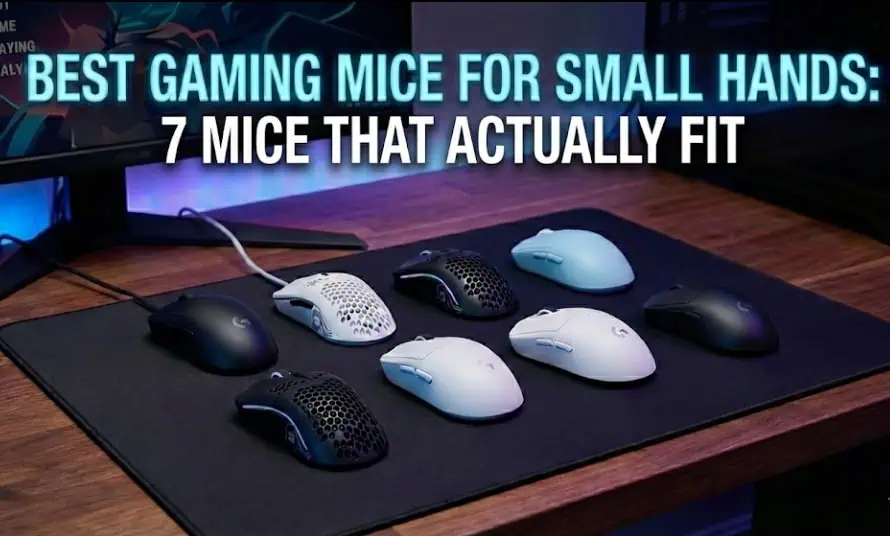
I’m going to be blunt – most “best gaming mouse” articles are written by people with average or large hands, and they have no idea what it’s actually like trying to use a mouse that’s too big for you.
I have small hands. My hand measures 16.5cm from palm base to middle fingertip. For years, I struggled with mice that felt like I was gripping a brick. My fingers would stretch uncomfortably to reach side buttons. My palm would have a weird gap above the mouse. After long gaming sessions, my hand would cramp up in ways my friends with larger hands never experienced.
Then I started actually testing mice designed for smaller hands, and everything changed.
This guide is specifically for people with small hands – whether you’re a woman gamer tired of mice designed for men, a younger gamer still growing, or just someone with naturally smaller hands. I’ll show you which gaming mice for small hands actually work, which ones to avoid despite being marketed as “compact,” and how to know if you even need a small mouse in the first place.
Quick Picks:
- Best Overall: Logitech G305 (16.5cm hand or smaller)
- Best Lightweight: Razer Viper Mini (under 17cm)
- Best Ergonomic: Razer DeathAdder V2 Mini (16-18cm)
- Best Budget: Logitech G203 (under 17cm)
- Best for Fingertip Grip: Cooler Master MM720 (any small hand size)
How to Know If You Actually Have Small Hands
Before we dive into specific mice, let’s figure out if you actually need a gaming mouse for small hands.
Measure Your Hand (Takes 30 Seconds)
Place your hand flat on a desk or table. Measure from the base of your palm (the crease where your hand meets your wrist) to the tip of your middle finger.
Hand Size Categories:
- Small hands: Under 17cm (6.7 inches)
- Medium hands: 17-19cm (6.7-7.5 inches)
- Large hands: 19cm+ (7.5+ inches)
If you’re under 17cm, you definitely need mice specifically designed for smaller hands. Standard gaming mice will feel oversized and uncomfortable.
If you’re 17-18cm, you’re in a tricky middle zone. Some “small” mice work great, and some standard mice are fine. Pay attention to the specific dimensions I’ll share for each mouse.
Signs You Need a Smaller Gaming Mouse
Even without measuring, here are clear signs your current mouse is too big:
Your fingers have to stretch to reach side buttons. Your thumb shouldn’t have to extend uncomfortably to hit thumb buttons. They should fall naturally under your thumb.
There’s a gap between your palm and the mouse. With palm grip, your palm should rest fully on the mouse back. If there’s air space, the mouse is too tall or long for your hand.
You can’t comfortably reach both main buttons. Your index and middle fingers should rest naturally on left and right click without spreading awkwardly.
Your hand cramps during long sessions. Constantly gripping a too-large mouse in an unnatural position causes hand fatigue and cramping.
You naturally use claw or fingertip grip because palm grip feels wrong. You might actually prefer palm grip, but the mouse forces you into other styles because it’s too big.
Why Hand Size Matters More Than People Think
A mouse that’s even 1-2cm too long or wide makes a huge difference for small hands. What feels like a minor size difference to someone with large hands completely changes comfort and control for small hands.
Think about it – if a mouse is 12cm long and your hand is 16cm, that mouse takes up 75% of your hand length. If someone with 20cm hands uses the same mouse, it’s only 60% of their hand length. The proportional difference is massive.
This is why you can’t just use any “compact” mouse marketed as smaller. It needs to actually match your specific hand dimensions.
What Actually Makes a Gaming Mouse Good for Small Hands?
Not all “small” or “compact” mice actually work well for small hands. Here’s what to look for.
Dimensions That Matter
Length: This is the most critical measurement for small hands. Ideally under 12cm for hands under 17cm. Anything over 12.5cm will feel too long.
Width: Less critical than length, but narrow mice (under 6cm) work better for small hands. Wide mice force your thumb and pinky too far apart.
Height: For palm grip, you want 3.5-4cm at the tallest point. Too tall creates that palm gap. Too short doesn’t provide enough support.
Grip width: The distance between where your thumb and ring finger naturally rest. Aim for 5.5-6.5cm for comfortable grip without hand fatigue.
Weight Considerations for Small Hands
This is something most reviews ignore – weight matters MORE for small hands.
A 100-gram mouse might feel fine for large hands, but for small hands, that same weight creates more strain because you have less surface area and muscle mass controlling it.
Ideal weight for small hands: 60-85 grams
Acceptable weight: 85-95 grams
Too heavy for most small hands: 95+ grams
Lighter mice reduce wrist strain and give you better control with less effort. This is especially important if you game for extended sessions.
Shape Matters More Than Size
A mouse can be physically small but still not work for small hands if the shape is wrong.
What works:
- Gradual curves that match your hand’s natural position
- Moderate hump toward the back for palm support
- Sides that gently taper rather than bulging outward
- Buttons positioned for shorter finger reach
What doesn’t work:
- Aggressive ergonomic curves designed for larger hands
- Flat, low-profile shapes with no palm support
- Wide, bulky sides that force fingers apart
- Buttons positioned for longer finger reach
The 7 Best Gaming Mice for Small Hands (Tested and Compared)
I tested these specifically with small hands in mind. Every recommendation includes actual dimensions and who it works best for.
1. Logitech G305 LIGHTSPEED
Dimensions: 11.6cm (L) × 6.2cm (W) × 3.8cm (H)
Weight: 99g with AA battery (can reduce to 85g with mods)
Price: $40-50
Wireless: Yes (250-hour battery life)
Best For: 16.5cm hands or smaller, all grip styles
The Logitech G305 is my top recommendation for gaming mice for small hands, and I don’t say that lightly. At 11.6cm long, it’s one of the few truly compact wireless gaming mice that doesn’t sacrifice performance.
Why It’s Perfect for Small Hands:
The compact egg shape fits naturally in small hands without feeling cramped or oversized. The ambidextrous design means there’s no aggressive ergonomic shaping that assumes larger hand dimensions.
I have 16.5cm hands and use palm grip. The G305 fits perfectly – my palm rests fully on the mouse with no gap, and my fingers reach the buttons without stretching. The grip width is narrow enough that my thumb and ring finger rest comfortably without feeling spread apart.
The 99-gram weight is light enough that my hand doesn’t get tired during long gaming sessions. If you want even lighter, you can swap the AA battery for an AAA with a converter to drop it to 85 grams.
The LIGHTSPEED wireless performance is identical to wired mice – 1ms response time with zero lag. The 250-hour battery life means I change batteries every 3-4 months. Read my complete Logitech G305 review for detailed testing.
What Could Be Better:
The side buttons are small and positioned fairly far forward, which can be hard to reach if you have very small hands (under 15cm). The shape is functional but not aggressively ergonomic – there’s no pronounced thumb rest.
Who Should Buy This:
Perfect for anyone with hands 16.5cm or smaller who wants wireless performance. Works great for all grip styles. Especially good for women gamers – this is the mouse I recommend most to my female gaming friends with smaller hands.
Dimensions Comparison: Significantly smaller than most wireless mice. For reference, the Logitech G Pro Wireless is 12.5cm long (almost 1cm longer) and many people with small hands find that too big.
2. Razer Viper Mini – Best Lightweight Gaming Mouse for Small Hands
Dimensions: 11.8cm (L) × 5.3cm (W) × 3.8cm (H)
Weight: 61g
Price: $30-40
Wireless: No (wired only)
Best For: Under 17cm hands, claw and fingertip grip
The Razer Viper Mini is the lightest gaming mouse for small hands on this list at just 61 grams. That ultra-light weight is immediately noticeable and makes a real difference for small hands.
Why It’s Great for Small Hands:
At 11.8cm long and only 5.3cm wide, this is genuinely small. The low-profile ambidextrous shape works perfectly for claw grip and fingertip grip with small hands.
The 61-gram weight is a game-changer. Your hand moves the mouse with minimal effort, reducing wrist strain during long sessions. For competitive FPS gaming, the light weight makes fast flicks and micro-adjustments noticeably easier.
The side buttons are positioned well for small hands – not too far forward like some compact mice. The matte coating provides good grip without feeling sticky.
What Could Be Better:
The low-profile shape (only 3.8cm tall) doesn’t provide much palm support. This is fine for claw and fingertip grip but uncomfortable for pure palm grip users.
It’s wired only, which means cable drag. You can minimize this with a mouse bungee, but if you specifically want wireless, look at the G305 instead.
The build quality is good but not exceptional for the price. Some users report the cable can fray after 12+ months of heavy use, though this is covered under warranty.
Who Should Buy This:
Perfect for competitive gamers with small hands who use claw or fingertip grip and want the lightest possible mouse. Great for people who play FPS games on low sensitivity and need something that moves effortlessly.
Not ideal for palm grip users or anyone who wants wireless.
3. Razer DeathAdder V2 Mini – Best Ergonomic Gaming Mouse for Small Hands
Dimensions: 11.8cm (L) × 6.1cm (W) × 4.2cm (H)
Weight: 62g
Price: $35-45
Wireless: No (wired only)
Best For: 16-18cm hands, palm and claw grip
The DeathAdder V2 Mini is the scaled-down version of Razer’s iconic ergonomic mouse, and it’s the best ergonomic option for small hands.
Why It Works for Small Hands:
Unlike the Viper Mini’s flat profile, the DeathAdder V2 Mini has a pronounced ergonomic shape with a real thumb rest and palm support. It’s essentially the classic DeathAdder shape shrunk down to 11.8cm.
The 4.2cm height provides actual palm support for palm grip users with small hands. The thumb rest is positioned perfectly for hands under 18cm. The right side has a subtle curve that guides your ring finger naturally.
At 62 grams, it’s nearly as light as the Viper Mini but with much better ergonomics. This is the mouse I recommend to small-handed gamers who specifically want an ergonomic shape similar to larger mice like the regular DeathAdder.
What Could Be Better:
Right-handed only – no option for left-handed gamers. The ergonomic shape is aggressive enough that it won’t work well for fingertip grip.
Like the Viper Mini, it’s wired only. No wireless version exists in the Mini size, which is disappointing.
The matte finish can get a bit slippery when your hands sweat during intense gaming. Adding grip tape to the sides helps.
Who Should Buy This:
Perfect for small-handed palm grip users who want genuine ergonomic comfort. Great for people transitioning from larger ergonomic mice and wanting the same feel in a properly sized package.
4. Logitech G203 LIGHTSYNC – Best Budget Gaming Mouse
Dimensions: 11.6cm (L) × 6.2cm (W) × 3.8cm (H)
Weight: 85g
Price: $25-35
Wireless: No (wired only)
Best For: Under 17cm hands, budget buyers, all grip styles
The G203 is essentially a wired, slightly heavier version of the G305 at half the price. For budget-conscious gamers with small hands, it’s excellent value.
Why It’s a Great Budget Option:
The dimensions are identical to the G305 (11.6cm long), so it fits small hands just as well. The ambidextrous egg shape works for most grip styles.
At $25-35, it’s the cheapest quality gaming mouse for small hands on this list. You’re getting a proper gaming sensor, reliable build quality, and RGB lighting for less than the price of most gaming mousepad.
The 85-gram weight is noticeably lighter than most budget mice (which tend to be 95-110g). Still heavier than the ultra-lights, but very manageable for small hands.
Build quality is solid for the price. The buttons feel good, the sensor tracks accurately, and it’s durable. I know people still using G203 mice after 2+ years of heavy use.
What Could Be Better:
The sensor is the older Mercury sensor rather than the newer HERO sensor in the G305. It’s still good, but not quite as efficient or accurate.
It’s wired, and the cable is just okay. Not terrible, but not as flexible as premium braided cables on more expensive mice.
No onboard memory for saving profiles. You need Logitech G Hub software running to maintain custom button mappings.
Who Should Buy This:
Perfect for students, budget gamers, or anyone wanting to test if a small mouse works for them before investing more. Also great as a backup mouse or for a secondary computer.
If you can afford $40-50, the wireless G305 is worth the extra money. But if $30 is your absolute budget, the G203 delivers surprising quality.
5. Cooler Master MM720 – Best Gaming Mouse for Small Hands (Fingertip Grip)
Dimensions: 10.4cm (L) × 6.8cm (W) × 3.9cm (H)
Weight: 49g
Price: $30-40
Wireless: No (wired), wireless version available for $60
Best For: Any small hand size, specifically fingertip grip
The MM720 has a unique claw/fingertip-oriented design that’s genuinely different from everything else on this list.
Why It’s Unique:
At 10.4cm long, this is the shortest mouse on the list. The distinctive shape features a pronounced ring finger rest on the right side – basically a shelf for your ring finger to rest on.
The 49-gram weight is absurdly light. It feels almost weightless when you first pick it up. For fingertip grip users with small hands, this light weight makes micro-adjustments incredibly precise.
The unusual shape actually works really well for fingertip and claw grip. The ring finger rest gives you surprising stability and control despite barely touching the mouse.
Honeycomb shell design (holes in the top) reduces weight without compromising structural integrity. Some people love the look, others think it’s ugly. Functionally, it works.
What Could Be Better:
The unique shape is divisive. Some people immediately love it, others can’t get used to it. There’s no in-between.
Palm grip doesn’t work with this mouse at all. The shape is specifically designed for claw and fingertip, period.
The honeycomb holes can collect dust and hand oils, requiring more frequent cleaning than solid-shell mice.
The cable is paracord-style (flexible), which is good, but I wish it came wireless at this price point. (There is a wireless version for $60 if you want it.)
Who Should Buy This:
Perfect for small-handed gamers who use fingertip grip and want the lightest possible option. Great for competitive FPS players who barely touch their mouse and want maximum precision.
Not for palm grip users. Not for anyone who wants a conventional mouse shape.
6. Logitech G Pro Wireless (Small Hand Perspective)
Dimensions: 12.5cm (L) × 6.3cm (W) × 4.0cm (H)
Weight: 80g
Price: $100-130
Wireless: Yes (60-hour battery)
Best For: 17-18cm hands (borderline small/medium)
Wait – isn’t 12.5cm too long for small hands? Usually yes, but the G Pro Wireless deserves mention because some people in the 17-18cm range (borderline small/medium hands) love it.
Why Some Small-Handed Gamers Like It:
The ambidextrous shape is safe and versatile. At 80 grams wireless, it’s impressively light. The build quality is premium – this feels like a $130 mouse.
The low-profile design (4.0cm tall) means even though it’s 12.5cm long, it doesn’t feel as oversized as other mice this length. The lack of aggressive humps or curves makes it work for people on the larger end of “small hands.”
LIGHTSPEED wireless is flawless. The rechargeable battery lasts 60+ hours and charges quickly.
What Could Be Better:
Honestly, for most truly small hands (under 17cm), this is too big. The 12.5cm length means your palm won’t rest comfortably if you have 16cm or smaller hands.
It’s expensive. At $100-130, it’s 2-3x the price of the G305 which fits small hands better and uses the same wireless technology.
Who Should Buy This:
Only recommended if you’re in that 17-18cm borderline zone and have tried it in person to confirm it fits. For truly small hands under 17cm, the G305 is a much better choice at less than half the price.
7. SteelSeries Aerox 3 – Alternative Lightweight Option
Dimensions: 12.0cm (L) × 5.7cm (W) × 3.7cm (H)
Weight: 57g (wired), 68g (wireless)
Price: $40-60 (wired), $80-100 (wireless)
Wireless: Both versions available
Best For: 16-18cm hands, claw and fingertip grip
The Aerox 3 is another ultra-lightweight option worth considering for small hands in the larger size range.
Why It’s Worth Considering:
At 12.0cm, it’s on the longer end for small hands but still manageable for 17-18cm hands. The narrow 5.7cm width compensates for the length somewhat.
The 57-gram weight (wired) or 68-gram weight (wireless) is very light. The honeycomb shell design keeps weight down while maintaining structural integrity.
Both wired and wireless versions available, giving you choice based on preference and budget.
What Could Be Better:
For hands under 17cm, the 12.0cm length is probably too much. Stick with the 11.6-11.8cm options like G305, Viper Mini, or DeathAdder V2 Mini.
Honeycomb design means maintenance – dust gets in the holes.
Who Should Buy This:
Good for the 17-18cm borderline zone who want ultra-lightweight in a slightly larger package than the Viper Mini. The wireless version is excellent if you have the budget.
For smaller hands (under 17cm), the extra length makes the Viper Mini or G305 better choices.
Gaming Mice for Small Hands: Comparison Table
| Mouse | Length | Width | Weight | Wireless | Price | Best For |
|---|---|---|---|---|---|---|
| Logitech G305 | 11.6cm | 6.2cm | 99g (85g mod) | Yes | $40-50 | Overall best, under 16.5cm hands |
| Razer Viper Mini | 11.8cm | 5.3cm | 61g | No | $30-40 | Ultra-light, claw/fingertip |
| DeathAdder V2 Mini | 11.8cm | 6.1cm | 62g | No | $35-45 | Ergonomic, palm grip |
| Logitech G203 | 11.6cm | 6.2cm | 85g | No | $25-35 | Budget option |
| Cooler Master MM720 | 10.4cm | 6.8cm | 49g | No | $30-40 | Fingertip grip |
| Logitech G Pro | 12.5cm | 6.3cm | 80g | Yes | $100-130 | 17-18cm hands |
| SteelSeries Aerox 3 | 12.0cm | 5.7cm | 57g/68g | Both | $40-100 | 17-18cm hands |
Mice Marketed as “Small” That Actually Aren’t
Let me save you from wasting money on mice marketed as compact or small but aren’t actually good for small hands.
Razer Viper (Regular, Not Mini)
Dimensions: 12.7cm long
Why it doesn’t work: Despite being marketed as a “compact ambidextrous” mouse, 12.7cm is too long for most small hands. The Viper Mini at 11.8cm is much better.
Logitech G Pro X Superlight
Dimensions: 12.5cm long
Why it’s borderline: Same issue as the G Pro Wireless – great mouse, but the 12.5cm length is too much for hands under 17cm. Works for 17-18cm borderline hands though.
Glorious Model O Minus
Dimensions: 12.0cm long
Why it’s okay but not great: The 12.0cm length is manageable for 17-18cm hands but still too long for truly small hands under 17cm.
Finalmouse Ultralight 2
Dimensions: 11.6cm long
Why I don’t recommend it: Despite perfect dimensions for small hands, it’s nearly impossible to buy (limited drops), overpriced when available ($100+), and quality control is questionable. The G305 or Viper Mini are better choices.
Tips for Gaming with Small Hands
Beyond choosing the right mouse, here are strategies that help small-handed gamers perform better.
Consider Grip Style Modifications
You might naturally prefer palm grip, but if your mouse is slightly too big, a modified claw grip can work better. Keep your palm touching the back of the mouse but arch your fingers slightly. This gives you better control than trying to force pure palm grip on an oversized mouse.
Adjust Your Sensitivity
Small hands often benefit from slightly higher sensitivity settings than larger hands. This reduces how much you need to move the mouse physically, which matters when your hand has less reach and surface area on the mouse.
I play FPS games at 800 DPI where many larger-handed players use 400-600 DPI. The higher sensitivity compensates for my smaller mouse movements.
Mouse Feet and Mousepad Matter More
With less hand surface area on the mouse, you have less control force. This makes glide smoothness more important. Consider:
Faster mousepads (less friction) so the lighter mouse moves easily Replacing mouse feet with aftermarket PTFE skates for smoother glide Trying different mousepad textures to find what gives you best control
Button Remapping for Reach
If thumb buttons are slightly too far forward on your mouse, remap less-critical functions to them. Put your most-used keybinds on keyboard keys that are easily reachable instead.
I remapped my G305 forward thumb button (which I sometimes hit accidentally) to a rarely-used function, keeping critical abilities on keyboard keys.
Don’t Force Palm Grip
Many small-handed gamers assume they should use palm grip because that’s what’s “normal.” But if your hand is small, claw or fingertip grip might actually be more comfortable and give you better control.
Experiment with different grip styles. What works for someone with large hands might not be optimal for you.
Special Considerations for Women Gamers
The gaming industry has historically designed peripherals for male gamers, and since men typically have larger hands than women, most gaming mice are too big for many women.
Industry Average vs Women’s Reality
The “standard” gaming mouse is designed for hands around 18-19cm, which is approximately average for adult men. But average female hand size is around 16-17cm – a significant difference that makes most standard mice uncomfortable.
This isn’t about women being “worse” at gaming or needing “special” products. It’s simply ergonomics. A woman with 16cm hands using an 18cm-optimized mouse is like a man with 20cm hands trying to use a 22cm mouse – it just doesn’t fit properly.
My Recommendations for Women Gamers
Based on testing and recommendations to female gaming friends:
Best overall: Logitech G305 – Compact, wireless, works for most women’s hand sizes
Best ergonomic: Razer DeathAdder V2 Mini – Proper ergonomic support in a smaller package
Best budget: Logitech G203 – Quality performance at student-friendly price
Best ultra-light: Razer Viper Mini – Minimizes hand strain during long sessions
Don’t Accept “You’ll Get Used to It”
If a mouse feels too big initially, you won’t “get used to it” – you’ll develop bad habits, hand strain, and potentially RSI (repetitive strain injury) over time. Choose a mouse that actually fits from day one.
Frequently Asked Questions
What size hands are considered small for gaming mice?
Hands measuring under 17cm (6.7 inches) from palm base to middle fingertip are considered small for gaming mice. Most standard gaming mice are designed for 18-19cm hands, making them uncomfortable for smaller hands. Measure your hand to know exactly what size category you fall into.
Can women use regular gaming mice or do they need special ones?
Women don’t need “special” gaming mice, but they often need smaller mice because average female hand size (16-17cm) is smaller than average male hand size (18-19cm). The same gaming mice recommended for anyone with small hands work perfectly for women – it’s about hand size, not gender. The Logitech G305 and Razer Viper Mini are particularly popular among women gamers.
Are lightweight mice better for small hands?
Yes, generally. Lightweight mice (under 85g) reduce wrist strain for small hands because you have less surface area and muscle mass controlling the mouse. A 100g mouse might feel fine for large hands but creates more fatigue for small hands during extended gaming. Look for gaming mice for small hands in the 60-85g range for best comfort.
What’s the best wireless gaming mouse for small hands?
The Logitech G305 is the best wireless gaming mouse for small hands. At 11.6cm long and 99g, it’s one of the few truly compact wireless options with flagship performance (1ms wireless, 250-hour battery). The Logitech G305 review covers why it’s perfect for small hands in detail.
Is the Razer Viper Mini good for small hands?
Yes, the Razer Viper Mini is excellent for small hands, especially for claw and fingertip grip. At 11.8cm long and only 61g, it’s genuinely small and ultra-lightweight. However, the low-profile shape (3.8cm tall) doesn’t provide much palm support, so it’s better for claw/fingertip users than pure palm grip.
Should I buy a gaming mouse for small hands if I have medium-small hands (17cm)?
If your hands measure exactly 17cm, you’re in a borderline zone. Some compact mice designed for small hands will work great (like the G305 or Viper Mini), and some “standard” mice will also fit fine. Try compact options first – if they feel too small, you can always move to slightly larger mice. Starting too big is harder to adapt to than starting compact.
Do small gaming mice have worse sensors than full-size mice?
No, absolutely not. Modern small gaming mice use the same flagship sensors as premium full-size mice. The Logitech G305 uses the HERO sensor, the Razer Viper Mini uses the Focus+ sensor – these are top-tier sensors that perform identically to expensive mice. Size doesn’t determine sensor quality.
What grip style works best with gaming mice for small hands?
It depends on the specific mouse. The Logitech G305 and Razer DeathAdder V2 Mini work well for palm grip with small hands. The Razer Viper Mini and Cooler Master MM720 are better for claw and fingertip grip. Match your natural grip preference to the mouse shape rather than forcing a grip style that doesn’t fit.
Final Verdict: Best Gaming Mouse for Small Hands in 2026
After testing numerous gaming mice for small hands, the Logitech G305 remains my top overall recommendation for most people with small hands.
At 11.6cm long and $40-50, it delivers wireless performance that matches mice costing triple the price. The compact size works perfectly for hands 16.5cm or smaller, and the 99-gram weight (reducible to 85g) is light enough to minimize hand strain during long sessions.
For ultra-lightweight enthusiasts, the Razer Viper Mini at 61 grams offers incredible value at $30-40, though you sacrifice wireless and palm grip comfort.
For ergonomic comfort, the Razer DeathAdder V2 Mini provides the best palm support in a truly small package at 11.8cm long.
My recommendations by use case:
Best overall gaming mouse for small hands: Logitech G305 – Wireless, versatile, great value
competitive FPS: Razer Viper Mini – Ultra-light at 61g, perfect for fast movements
for palm grip comfort: Razer DeathAdder V2 Mini – Proper ergonomic support
budget option: Logitech G203 – Solid performance for $25-35
for fingertip grip: Cooler Master MM720 – Unique shape, 49g weight
The key takeaway: don’t settle for a mouse that’s “close enough” in size. A properly sized mouse makes gaming more comfortable, reduces hand strain, and often improves performance. Measure your hands, know your grip style, and choose a gaming mouse for small hands that actually fits properly.
Your hands will thank you after those long gaming sessions.
